Safety doesn’t happen by accident—neither does consistent documentation. In high-risk industries like construction, manufacturing, and utilities, toolbox talks forms are more than paperwork; they’re frontline defenses against incidents. Yet, one of the most common hurdles teams face is finding the right toolbox talks forms download that are both compliant and practical.
Generic templates often fall flat. They might check regulatory boxes but fail in real-world usability—too vague, too rigid, or missing key fields. The best forms don’t just record attendance; they prompt discussion, capture hazards, and create accountability. This guide cuts through the noise, delivering actionable download options, proven templates, and strategies to turn routine forms into safety tools that work.
Why Standard Toolbox Talk Forms Fail (And How to Fix Them)
Many teams download a free form, print it, and assume compliance is achieved. But if the form doesn’t reflect actual job site conditions, it becomes box-ticking—not behavior change.
Common flaws in off-the-shelf forms:
- One-size-fits-all topics – A form about ladder safety won’t help an electrical crew working on live circuits.
- No hazard identification section – Missing space to log real-time risks spotted during the talk.
- Poor signature tracking – No clear lines for workers, supervisors, and dates.
- No follow-up action field – Preventing accountability for corrective steps.
What works instead: A strong toolbox talk form should include: - Date, time, location - Crew size and names/roles - Topic with space for custom tailoring - Key hazards discussed - Control measures reviewed - Signatures (with printed names) - Space for supervisor notes or follow-ups
When downloading, prioritize customizable and industry-specific forms over generic PDFs.
Key Elements of a High-Impact Toolbox Talk Form
A good form doesn’t just document—it drives engagement. Use this checklist when evaluating or designing your own:
#### 1. Clear Topic Header > Example: “Hot Work Permits – Welding Safety on Level 3” Avoid vague entries like “General Safety.” Specificity forces relevance.
#### 2. Attendee Roster with Signatures Include columns for: - Full name - Job title - Signature - Date
This creates legal defensibility during OSHA audits.
| #### 3. Hazard Identification Section Use a bullet or table format: | ||
|---|---|---|
| -------- | ------------------ | -------------------- |
| Loose guardrails | Install temporary barriers | Foreman J. Lee |
#### 4. Discussion Summary A 3–5 line field for the facilitator to summarize key takeaways. Keeps the talk focused.
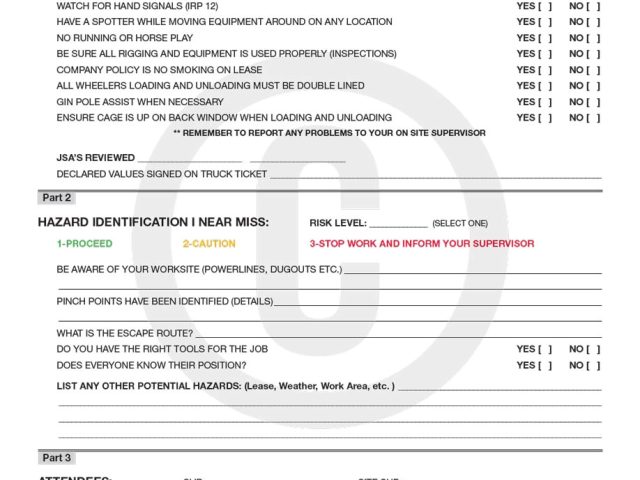
#### 5. Supervisor Review & Follow-Up A final block for: - Corrective actions - Due dates - Verification check
This closes the loop between talk and action.
Forms that skip these elements may satisfy paperwork requirements but rarely reduce risk.
Where to Find Reliable Toolbox Talks Forms Download Options
Not all free downloads are created equal. The best sources provide editable, professional templates that reflect real-world use. Here are five trusted options:
| Provider | Format | Customizable | Industry Focus | Notes |
|---|---|---|---|---|
| OSHA.gov | Limited | General | Official, compliant baseline | |
| SafetyCulture (iAuditor) | Digital + PDF | Full | Multi-industry | Free templates, mobile-friendly |
| Creative Safety Supply | PDF, Word | High | Manufacturing, warehouse | Visual aids included |
| FMI (Construction Safety) | Word, Excel | High | Construction | AEC-specific topics |
| EHS Hero | PDF, editable | Moderate | Industrial | Requires free account |
Tip: Avoid sites that demand excessive personal info for a “free” download. Reputable providers like OSHA or SafetyCulture offer instant access without bait-and-switch.
For teams using digital platforms, SafetyCulture stands out—its toolbox talk templates sync to mobile devices, auto-save to the cloud, and generate analytics. But for paper-based crews, FMI’s Word documents are ideal for local editing and printing.
How to Customize Downloaded Forms for Maximum Impact
Downloading a template is just step one. Real value comes from adaptation.
Step-by-step customization guide:
- Review your past incidents – If 30% of near-misses involve slips, add traction checks to your form.
- Map to current projects – Modify headings to reflect active tasks (e.g., “Roofing Work at Site B”).
- Use plain language – Replace jargon like “PPE” with “hard hat, gloves, harness.”
- Add company branding – Include logo, safety motto, and contact for safety officers.
- Test with a crew – Run a pilot talk using the form. Ask: Was it easy? Did it spark discussion?
Real-world example: A mid-sized electrical contractor downloaded a generic form but found attendance tracking inefficient. They modified it to include crew roles (foreman, apprentice, inspector) and added a checkbox for “Confirmed voltage lockout.” Result? A 40% increase in documented LO/TO verification in field audits.
Integrating Toolbox Talk Forms into Daily Workflow
A form is only as good as its consistency. Many companies fail not from poor templates, but poor process.
Effective implementation workflow:

- Schedule: Hold talks at shift start, not as an afterthought.
- Assign facilitators: Rotate among leads to build ownership.
- Store digitally: Scan completed forms into a shared drive or EHS system.
- Review monthly: Look for recurring hazards or missing signatures.
Common mistake: Holding the talk but filling out the form later—often from memory. This creates inaccuracies and weakens credibility during inspections.
Pro tip: Keep a clipboard with blank forms, pens, and a topic calendar at each site office. Make it as routine as the morning coffee run.
Digital vs. Paper Forms: Which Should You Download?
The format matters. While paper is still common, digital is rising fast.
| Factor | Paper Forms | Digital Forms |
|---|---|---|
| Setup cost | Low | Moderate (device + app) |
| Real-time access | No | Yes (cloud sync) |
| Signature capture | Manual | E-signature |
| Data analysis | Manual entry | Auto-generated reports |
| Audit readiness | Risk of loss/damage | Always accessible |
When to stick with paper: Small crews, remote sites with no connectivity, or short-term projects.
When to go digital: Large teams, multi-site operations, or companies pursuing ISO 45001 or other certifications.
Many download sites now offer dual-format templates—PDF for print, and editable versions for use in tools like Microsoft Forms or Google Sheets.
Top 5 Free & Editable Toolbox Talks Templates to Download Now
Here are five no-fluff, field-tested templates you can use immediately:
- OSHA Recommended Toolbox Talk Form
- - Source: OSHA.gov
- - Format: PDF
- - Best for: Compliance baseline
- - Direct link: www.osha.gov/sites/default/files/2018-12/toolbox_talk_form.pdf
- SafetyCulture General Toolbox Talk Template
- - Format: iAuditor (mobile app), exportable to PDF
- - Custom fields: Hazards, photos, action items
- - Ideal for: Teams ready to digitize
- FMI Construction Toolbox Talk Sheet
- - Format: Word
- - Editable: Yes
- - Includes: Topic suggestions by trade
- Creative Safety Supply Hazard-Specific Form
- - Topics: Confined space, forklifts, PPE
- - Format: PDF and Word
- - Plus: Visual icons for low-literacy crews
- EHS Daily Advisor Quick Talk Sheet
- - Format: Print-ready PDF
- - Strength: 10-minute talk structure
- - Use case: Fast-paced environments
Always verify download links from official domains—avoid third-party sites with misleading “premium” upsells.
Make Your Toolbox Talk Forms Work for You
Downloading a form is easy. Making it effective takes strategy. The best templates are specific, actionable, and integrated into daily routines. Whether you choose paper or digital, the goal is the same: turn a compliance task into a safety conversation that sticks.
Start by downloading one of the reliable templates above. Customize it to your crew’s current work. Test it in the field. Refine it. Repeat.
Safety isn’t about perfection—it’s about progress. And it begins with the right form in the right hands.
FAQ
What should you look for in Toolbox Talks Forms Download – Free Templates & Best Practices? Focus on relevance, practical value, and how well the solution matches real user intent.
Is Toolbox Talks Forms Download – Free Templates & Best Practices suitable for beginners? That depends on the workflow, but a clear step-by-step approach usually makes it easier to start.
How do you compare options around Toolbox Talks Forms Download – Free Templates & Best Practices? Compare features, trust signals, limitations, pricing, and ease of implementation.
What mistakes should you avoid? Avoid generic choices, weak validation, and decisions based only on marketing claims.
What is the next best step? Shortlist the most relevant options, validate them quickly, and refine from real-world results.